
Making a mortgage payment sounds simple — until your portal freezes, your check gets lost, or you realize you have no idea what that escrow charge actually is. If you have ever stared at your statement wondering where your money actually goes or scrambled to find the right phone number before a late fee hits, you are not alone. Most homeowners figure this out the hard way.
This guide walks you through every single way to make your arvest mortgage payment, what your monthly bill actually covers, and what to do when things do not go as planned. By the end, you will know exactly where to go, what to do, and how to stay ahead.
New to Arvest? What to Know If Your Loan Was Just Transferred
Sometimes homeowners do not choose Arvest — their loan gets transferred from another servicer. This happens when lenders sell mortgage servicing rights, and it is completely normal. Your loan terms do not change, but your payment process does.
When your loan transfers, Arvest sends a welcome letter with your new account number and first payment due date. There is a 60-day grace period after a transfer during which Arvest cannot report you late to credit bureaus. Do these three things as soon as your transfer happens:
- Register your account at mymortgage.arvest.com using your new loan number
- Set up a new autopay — your old servicer’s draft does not carry over automatically
- Keep your welcome letter safe — it has your account number and first due date
Missing the autopay step is the most common reason transferred customers get hit with unexpected late fees.
Arvest Mortgage Payment Methods: 6 Ways to Pay
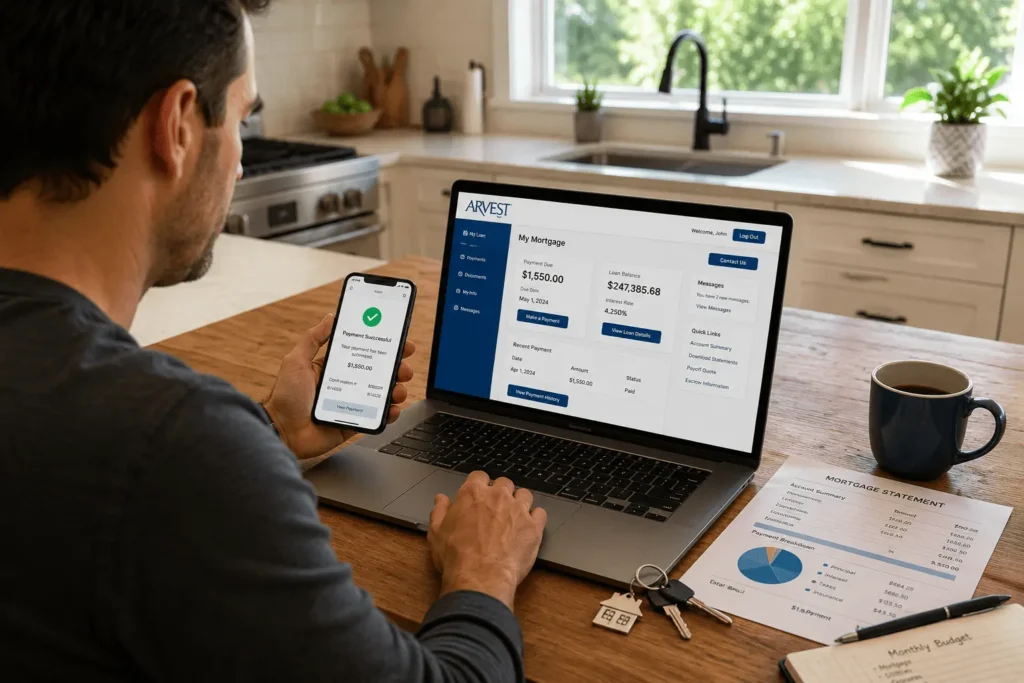
There is no single right way to pay — Arvest gives you six options depending on what works best for you. Some are instant, some take a few days, and one is completely automated so you never have to think about it again.
Online via myMortgage Portal
The fastest and most convenient method is paying directly through mymortgage.arvest.com. You can make a one-time payment or schedule future payments from your dashboard. The portal is available 24 hours a day, 7 days a week with no processing fee.
How to Log In to mymortgage.arvest.com
Logging in takes less than a minute once your account is set up. Follow these steps:
- Go to mymortgage.arvest.com
- Click Log In at the top right corner
- Enter your username and password
- First time? Click Sign Up and register using your loan number and last 4 digits of your SSN
- Forgot your password? Click the reset link on the login page and follow the email prompt
If you need detailed instructions for account access, password recovery, or first-time registration, check our complete Arvest Mortgage Login guide.
Autopay / Auto Draft Enrollment
Autopay is the easiest way to make sure you never miss a payment. Log in to your account, go to the Payments section, and select Automated Payments to enroll. You choose the draft date and the amount, and Arvest pulls it from your bank account automatically each month.
Pay by Phone — Automated System or Live Rep
Call 800-366-2132 and select option 2 to use the automated phone system any time of day. If you prefer to speak with someone, stay on the line for a live representative. Phone payments may carry a small processing fee — check the current schedule at mymortgage.arvest.com/resources/mortgage-fee before calling.
Bank Bill Pay
You can pay through your own bank’s online bill pay system by adding Arvest Bank as a payee. Use your mortgage loan number as the account number when setting it up. Allow 3 to 5 business days for the payment to process and post to your account.
Mail a Check to Arvest
Make your check payable to Arvest Bank and send it to: P.O. Box 661005, Dallas, TX 75266-1005
Write your loan number on the memo line of every check you mail. Allow at least 5 to 7 business days for delivery and processing to avoid any risk of a late posting.
Pay in Person at an Arvest Branch
You can walk into any Arvest Bank branch and make your mortgage payment directly with a teller. This option works well for escrow shortage payments and for customers who prefer face-to-face transactions. Branches are located across Arkansas, Kansas, Missouri, and Oklahoma.
Bi-Weekly FlexPayment Program: Pay Less Interest Over Time
Arvest offers a FlexPayment Drafting program for eligible loans that splits your monthly payment into two smaller drafts every two weeks. Because there are 52 weeks in a year, this results in 26 half-payments — the equivalent of 13 full payments instead of the standard 12.
That one extra payment per year goes directly toward your principal balance. Over the life of a 30-year loan, this can shorten your payoff timeline by several years and save you tens of thousands of dollars in total interest. The math is straightforward but the long-term savings are real.
Here is a quick comparison of monthly vs bi-weekly payments:
| Payment Type | Payments Per Year | Extra Payment | Interest Savings |
|---|---|---|---|
| Monthly | 12 | None | Baseline |
| Bi-Weekly FlexPayment | 26 half-payments (13 full) | 1 full payment | Significant over 30 years |
To enroll, call Arvest Mortgage Servicing at 800-366-2132. Not all loans are eligible, so confirm your eligibility before requesting enrollment. A setup fee may apply depending on your loan terms.
How to Pay Down Your Arvest Mortgage Faster With Principal-Only Payments
Making extra payments toward your principal is one of the smartest things a homeowner can do. Every extra dollar applied to principal reduces your balance faster, which means less interest accrues over the remaining life of your loan.
To make a principal-only payment, log in to mymortgage.arvest.com and designate the extra amount as principal only during the payment process. If you mail a check, write “principal only” clearly on the memo line. Without this label, Arvest may apply the funds toward your next scheduled payment instead of your balance.
Even an extra $50 or $100 each month adds up significantly over time. Use the payoff calculator at arvest.com/calculators/mortgage-payoff to see exactly how much time and money you can save based on your current loan balance and interest rate.
Payment Due Date, Grace Period, and Late Fee Policy
Your mortgage payment is due on the first of each month. Arvest gives you a 15-day grace period — as long as your payment posts by the 16th, no late fee is charged. This buffer exists for situations like weekends, banking delays, or a tight pay schedule.
If your payment does not post by the end of the grace period, a late fee is applied. Late fee amounts are determined by your loan documents and applicable state law, so the exact amount varies by borrower. You can find your specific late fee in your original mortgage note or by logging in to your account.
Relying on the grace period every month is a risky habit. If your payment is 30 or more days late, it gets reported to the credit bureaus and can cause serious damage to your credit score. Enrolling in autopay removes this risk completely.
What Does Your Arvest Mortgage Payment Include Each Month

Most homeowners know their payment amount but not what it actually covers. Your monthly bill is typically made up of four components, commonly referred to as PITI:
- Principal — reduces your outstanding loan balance each month
- Interest — the cost Arvest charges for lending you the money
- Taxes — property tax funds collected in escrow and paid to your local authority
- Insurance — homeowners insurance, and mortgage insurance or flood insurance if applicable
Principal and Interest
The principal portion of your payment chips away at what you owe. The interest portion is what Arvest earns for providing the loan. Early in your mortgage, most of each payment goes toward interest — this is how amortization works. Over time, the balance shifts and more of your payment reduces your actual loan balance.
Log in to mymortgage.arvest.com and go to the My Loan section to view your full amortization schedule. It shows exactly how each payment is applied from your first month to your final payoff date.
Escrow — Property Taxes and Homeowners Insurance
Arvest collects a portion of your property taxes and insurance premiums with each monthly payment and holds those funds in an escrow account. When the bills come due, Arvest pays them directly on your behalf. You do not have to save separately for these large annual expenses.
Your escrow account may also cover private mortgage insurance (PMI), mortgage insurance premium (MIP), or flood insurance depending on your loan type and property location. The balance builds throughout the year and is drawn down as payments are made.
Annual Escrow Analysis and Why Your Payment Changes
Once a year, Arvest reviews your escrow account to make sure the right amount is being collected. If your property taxes or insurance costs went up, your monthly payment increases to cover the new amount. If Arvest collected more than needed, you get a refund or a payment reduction.
A surplus of $50 or more is refunded directly to you if your loan is current. A shortage can be paid as a lump sum or spread across your next 12 monthly payments. Arvest mails an escrow analysis statement each year explaining exactly what changed and why.
Can’t Make Your Payment? Hardship Assistance Options
Missing a payment is stressful, but reaching out to Arvest early gives you the best shot at avoiding serious damage. Arvest has a dedicated hardship assistance program with multiple options based on your situation.
| Option | How It Works | Best For |
|---|---|---|
| Forbearance | Temporarily pauses or reduces payments | Job loss, medical emergency, natural disaster |
| Repayment Plan | Regular payment plus a portion of past-due balance | Hardship resolved, ready to catch up gradually |
| Deferral / Partial Claim | Past-due amount moved to end of loan, interest-free | Can afford regular payments but not a lump sum |
| Loan Modification | Permanent change to loan terms or interest rate | Long-term hardship with no quick resolution |
Call 800-366-2132 as soon as you know you cannot make a payment. You can also visit mymortgage.arvest.com/resources/hardship-assistance for full details. For independent guidance, a HUD-certified housing counselor is available toll-free at 800-569-4287.
How to Request Your Loan Payoff Quote
A payoff quote tells you the exact dollar amount needed to fully pay off your mortgage on a specific date. This number is different from your current balance because it includes interest that will accrue between now and your chosen payoff date.
The fastest way to get your quote is through mymortgage.arvest.com — log in, go to the Payments section, and select Loan Payoff for instant 24/7 access. You can also call the automated system at 800-366-2132 and request the quote by phone — statements requested this way are returned via fax within 48 hours.
Title companies and real estate attorneys can call 800-366-2132 directly to request payoff information. Written borrower authorization is required for any payoff details requested by email or fax for security purposes.
How to View Your Arvest Payment History and IRS Form 1098
Staying on top of your payment records matters for budgeting, tax filing, and tracking your loan progress. Arvest gives you full access to your history through the online portal at any time.
Log in to mymortgage.arvest.com, navigate to the Payments tab, and use the filter options to sort by date, amount, or payment type. You can see a clear breakdown of how much of each payment went toward principal versus interest — useful for understanding how your balance is shrinking over time.
At the end of each tax year, Arvest issues IRS Form 1098, which reports the total mortgage interest you paid. Here is what you need to know about your 1098:
- The physical copy is mailed to you by January 30th each year
- You can access it online earlier through the My Loan section of your account
- It is the document you need to claim the mortgage interest deduction when filing taxes
- For questions about your 1098, call 800-366-2132 or log in to your account directly
Conclusion
Every question you came here with now has a clear answer. From setting up autopay to understanding your escrow analysis, from requesting a payoff quote to getting hardship help when life gets hard — your arvest mortgage payment process does not have to feel complicated. Pick the payment method that fits your life, set it up once, and let it run. You have everything you need right here to stay current, save money, and pay off your home on your own terms.
Frequently Asked Questions
How Do I Make an Arvest Mortgage Payment Online?
Log in to mymortgage.arvest.com, go to the Payments section, and select Make a Payment. You can submit a one-time payment or schedule future payments at no cost. The portal is available 24 hours a day, 7 days a week for all account holders.
What Is the Grace Period for Arvest Mortgage Payments?
Arvest provides a 15-day grace period on all mortgage payments. Your payment is due on the first of each month, but as long as it posts by the 16th, no late fee is charged. After the grace period ends, a late fee applies based on your loan documents and state law.
How Do I Set Up Autopay for My Arvest Mortgage?
Log in to mymortgage.arvest.com, navigate to Automated Payments, and enter your bank account details. You choose the draft date and amount. To cancel or change autopay, submit your request at least five business days before your next scheduled draft date.
What Hardship Assistance Options Does Arvest Mortgage Offer?
Arvest offers forbearance, repayment plans, deferral, and loan modification for customers facing financial difficulty. Call 800-366-2132 as soon as possible to discuss your options. A HUD-certified housing counselor is also available toll-free at 800-569-4287 for independent guidance.
How Do I Get an Arvest Mortgage Payoff Quote?
Log in to mymortgage.arvest.com and select Loan Payoff under the Payments section for instant 24/7 access to your quote. You can also call 800-366-2132 to request a payoff statement by phone. Title companies may request payoff information directly by calling the same number with written borrower authorization.