Buying a home is one of the biggest financial decisions of your life — and most people go into it without knowing their actual monthly number. You find a house you love, the price looks reasonable, but then the real question hits you: what will this actually cost every single month? Guessing leads to budget surprises, loan stress, and sometimes a payment you were never truly ready for. The arvest mortgage calculator takes that uncertainty off the table completely. It shows you a clear, honest payment estimate before you ever sit across from a lender.
This guide walks through every calculator Arvest offers, how to use each one the right way, and what the results actually mean for your budget. By the end, you will know which tool fits your situation, what numbers to enter, and how to read the output with real confidence.
What Is the Arvest Mortgage Calculator?
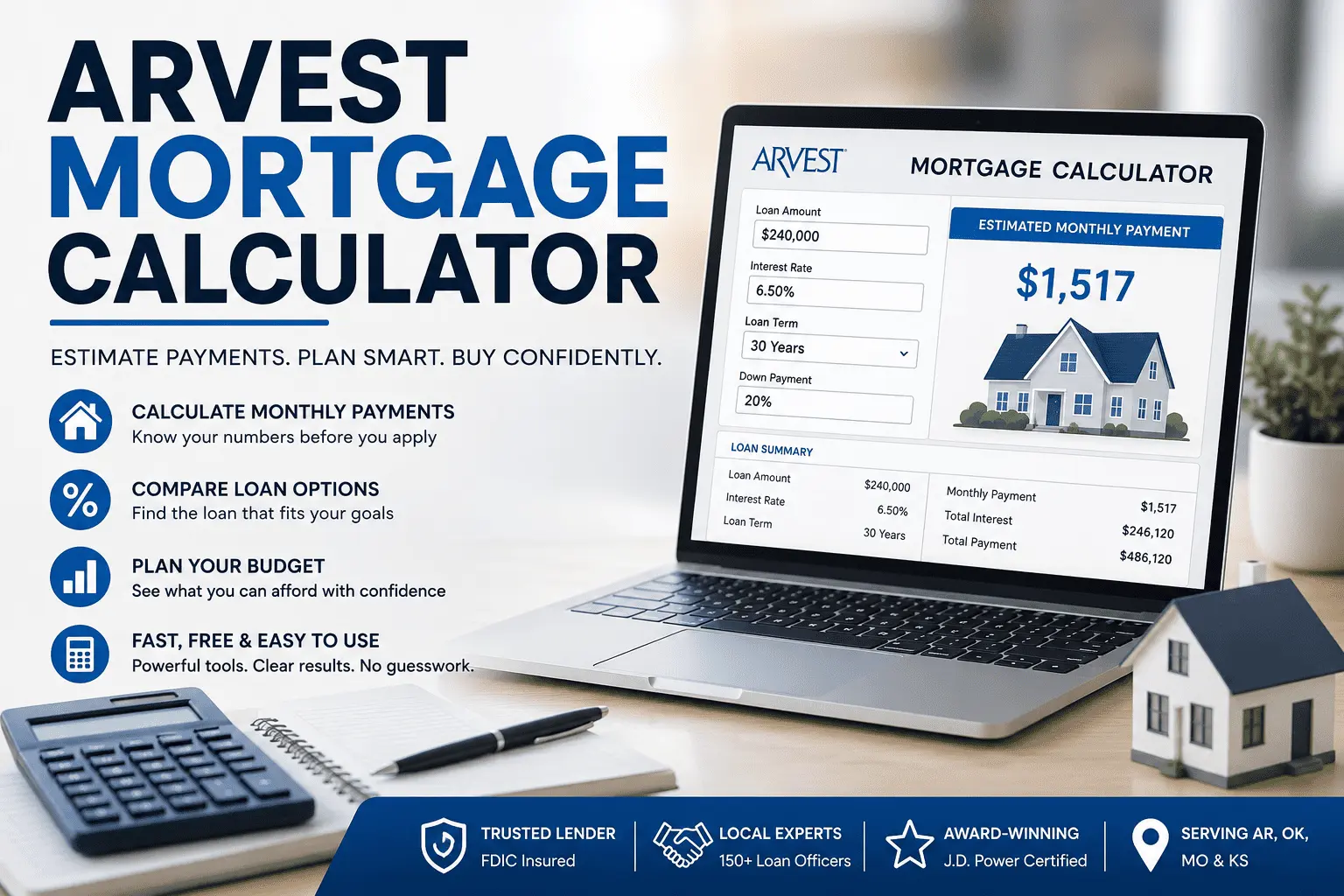
The Arvest mortgage calculator is a free online tool that helps you estimate your monthly home loan payment before you apply. You enter basic details like loan amount, interest rate, and loan term, and the calculator instantly produces your estimated monthly payment. These tools are available at arvest.com and through the Arvest Mortgage Division portal with no login required.
Arvest Bank is the largest mortgage lender in Arkansas and has originated over $2 billion in home loans. It serves borrowers across Arkansas, Oklahoma, Missouri, and Kansas through more than 150 loan officers. The bank has earned the J.D. Power award for Highest Customer Satisfaction in the Southwest Region three consecutive years and is FDIC insured. The calculator suite is for planning purposes only and does not represent a loan approval, a rate lock, or a formal commitment from the bank.
All Arvest Mortgage Calculators and When to Use Each One
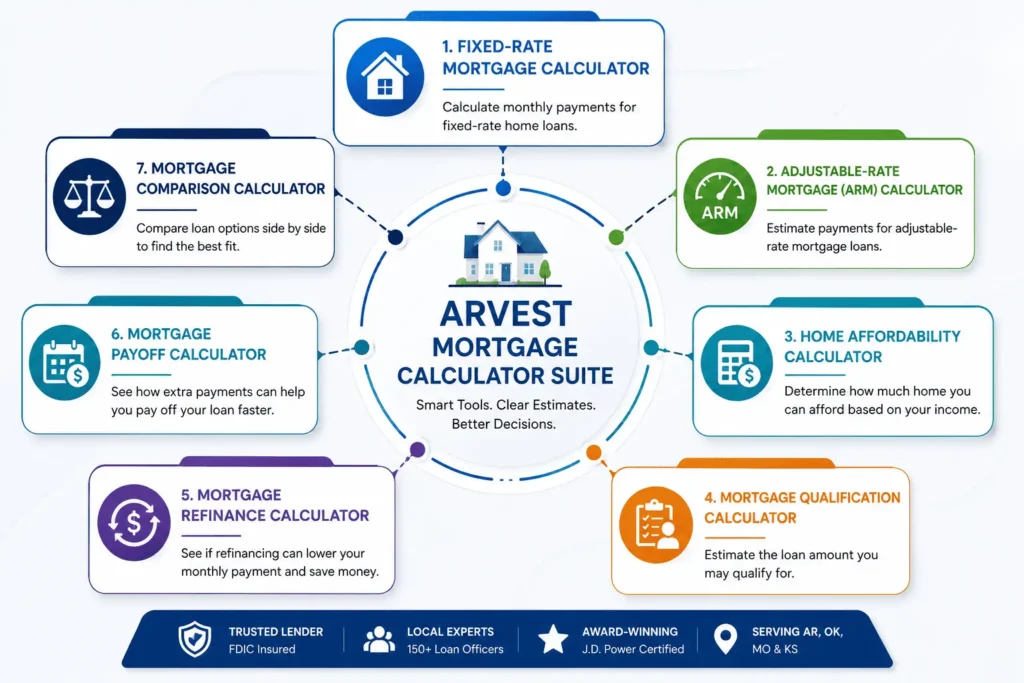
Arvest does not offer just one calculator. It has a full suite of seven tools, each designed for a specific borrowing situation. Knowing which one to use gives you more accurate and useful results than picking one at random.
Fixed-Rate Mortgage Calculator
This tool estimates your monthly principal and interest payment on a fixed-rate loan. Your interest rate stays the same for the entire loan term, so your payment never changes. Use this if you are buying a home and want full payment stability over 15 or 30 years. It is the most commonly used calculator in the entire Arvest suite.
Adjustable-Rate Mortgage (ARM) Calculator
An ARM starts with a lower fixed rate for an introductory period and then adjusts annually after that. Arvest offers ARM structures including 3/1, 5/1, 7/1, and 10/1 terms. Use this if you plan to sell or refinance before the adjustment period begins. It shows your starting monthly payment based on the initial rate only — future payment changes after adjustment cannot be predicted by any calculator.
Home Affordability Calculator
This tool works backwards from your income. You enter your gross annual income and monthly expenses, and it estimates the maximum home price you may be able to afford. A widely used guideline here is the 28/36 rule — spend no more than 28% of your gross monthly income on housing costs and no more than 36% on total monthly debt. Use this calculator early in your home search when you do not yet have a specific property in mind.
Mortgage Qualification Calculator
This calculator estimates the maximum loan amount Arvest may approve based on your annual income, existing debts, and financial profile. Lenders typically look for a debt-to-income ratio below 43% when reviewing applications. This is different from the affordability calculator because it focuses on what the bank will lend, not just what fits comfortably in your budget. Use this before meeting a loan officer so you walk in with realistic expectations.
Mortgage Refinance Calculator
Already have a mortgage? This tool helps you decide if refinancing makes financial sense. You enter your current loan details and the proposed new loan terms, and the calculator shows your monthly savings and break-even point — the number of months it takes to recover your closing costs through the lower payment. Use it when market rates drop significantly or when you want to shorten your remaining loan term.
Mortgage Payoff Calculator
This tool shows how much interest you save by making extra payments each month and exactly how much sooner you pay off your loan. Even an extra $100 per month can save thousands of dollars on a 30-year loan. On a 15-year loan, equity builds much faster than on a 30-year loan because more of each payment goes toward the principal balance from the start. Use this if you want to reduce your total borrowing cost and reach full ownership sooner.
Mortgage Comparison Calculator
This is one of the most powerful tools Arvest offers and one of the least used. It lets you compare two or three loan scenarios side by side and shows the total cost difference over the full loan term. You can compare a 15-year vs 30-year fixed loan, a fixed rate vs an ARM, or even a balloon mortgage payment structure against a standard fixed option. Use this when you are deciding between multiple loan choices and need the complete long-term financial picture before committing.
How to Use It Step by Step
Using any Arvest calculator takes under two minutes. These steps apply to the fixed-rate calculator and most others in the suite:
- Step 1 — Enter your loan amount. This is your home purchase price minus your down payment.
- Step 2 — Input your interest rate. Use the current rate from Arvest’s mortgage rates page that matches your loan type and credit score range.
- Step 3 — Select your loan term — 15 years or 30 years based on your goal.
- Step 4 — Add your down payment amount or percentage. Common options are 3%, 5%, 10%, and 20% — each has a different impact on your loan amount and PMI requirement.
- Step 5 — Review your results. You will see your estimated monthly payment, total interest paid over the life of the loan, and a full amortization schedule.
The amortization schedule is worth understanding. On a $240,000 loan at 6.5% over 30 years, your very first payment of roughly $1,517 sends approximately $277 toward your principal balance and $1,300 toward interest. By year 20, that same $1,517 payment sends over $700 to principal. The schedule shows this shift month by month so you can track exactly how your balance drops and how your equity grows over time.
Sample Calculation With Real Numbers
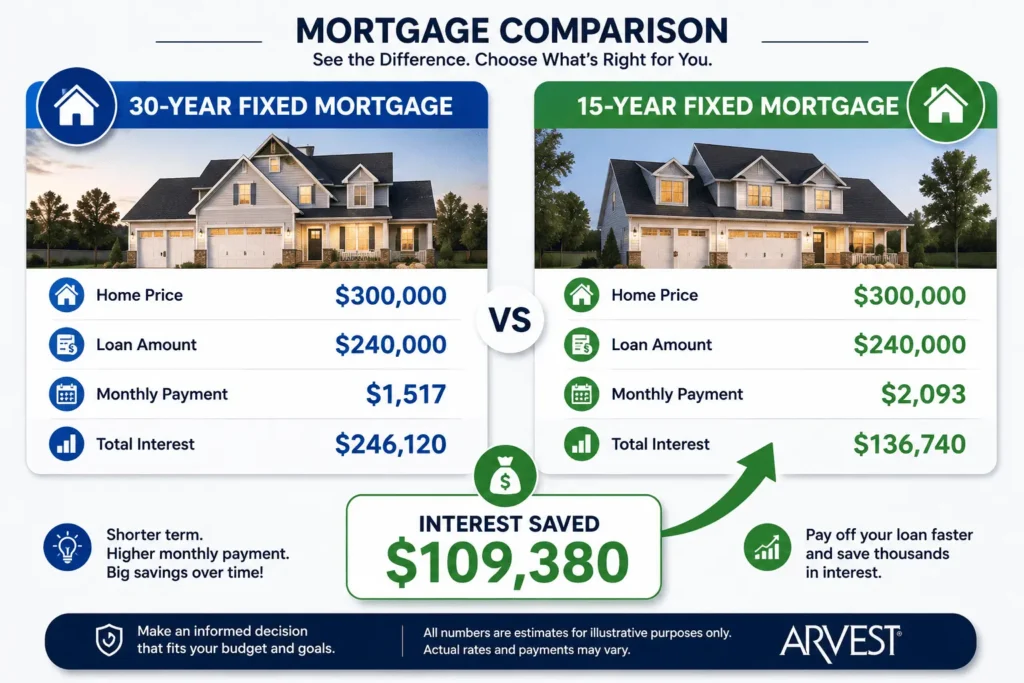
Here is what the calculator shows on a typical home purchase. This example uses a $300,000 home with a 20% down payment and a 6.5% interest rate.
| 30-Year Fixed | 15-Year Fixed | |
|---|---|---|
| Home Price | $300,000 | $300,000 |
| Down Payment (20%) | $60,000 | $60,000 |
| Loan Amount | $240,000 | $240,000 |
| Interest Rate | 6.5% | 6.5% |
| Monthly Payment | ~$1,517 | ~$2,093 |
| Total Interest Paid | ~$246,120 | ~$136,740 |
| Interest Saved | — | ~$109,380 |
The 15-year loan saves over $109,000 in total interest. But it costs $576 more every single month. The calculator helps you see which option genuinely fits your budget — not just which one looks better on paper.
Rate changes also matter more than most buyers realize. If the rate on that same $240,000 loan increases by just 0.5% to 7%, your monthly payment jumps from roughly $1,517 to approximately $1,597. That is $80 more every month, $960 more every year, and nearly $29,000 more in total interest over 30 years. Running multiple rate scenarios in the calculator before you apply can save you a significant amount of money.
What It Does Not Include
The monthly figure the calculator produces covers principal and interest only. Your real monthly housing cost will always be higher. Here is what is not factored into the result:
- Property taxes — vary by county across Arkansas, Oklahoma, Missouri, and Kansas and can add hundreds to your monthly cost
- Homeowner’s insurance — required by all mortgage lenders before closing
- PMI (Private Mortgage Insurance) — required on conventional loans when your down payment is under 20%. It typically costs 0.5% to 1% of your loan amount annually and can be removed once you reach 20% equity in your home
- MIP (Mortgage Insurance Premium) — FHA loans use MIP instead of PMI. The structure and removal rules are different — MIP often stays for the life of the loan depending on your down payment
- Escrow account — Arvest collects property taxes and homeowner’s insurance as part of your monthly payment and holds them in an escrow account until those bills come due. This amount sits on top of your principal and interest payment
- HOA fees — applicable if your property is in a managed community
- Closing costs — include origination fee, appraisal fee, and title insurance, typically ranging from 2% to 5% of the loan amount
A practical way to think about your true monthly cost is PITI — Principal, Interest, Taxes, and Insurance. The calculator shows only the PI portion. Always request an official Loan Estimate from Arvest after pre-approval to see your full PITI figure in one document. You can also review the Arvest mortgage payment structure to understand exactly how your payment is applied after closing.
What Interest Rate Should You Enter in the Arvest Calculator?
This is where most people get inaccurate results. Entering a rate from a national news headline gives you a number that has nothing to do with what Arvest will actually offer you based on your personal financial profile.
Fixed-Rate vs ARM — Which Rate to Use
For a fixed-rate loan, use the current 15-year or 30-year conventional rate published directly on Arvest’s website. For an ARM, enter the initial introductory rate — but understand clearly that this rate only applies during the fixed introductory period. After that period ends, your rate adjusts annually based on a market index, and your monthly payment can increase significantly depending on where rates move.
How Your Credit Score Affects the Rate
Your credit score is one of the most important factors that determines the rate Arvest will offer you. Your loan-to-value ratio also plays a direct role — a lower LTV signals less risk to the lender and typically results in a better rate. Here is a general breakdown for a 30-year conventional loan on a $240,000 balance:
- 760 and above — approximately 6.5% rate, roughly $1,517 per month
- 700 to 759 — approximately 6.75% rate, roughly $1,557 per month
- 660 to 699 — approximately 7.25% rate, roughly $1,638 per month
The difference between a 760 score and a 660 score on this example is over $120 per month. That adds up to nearly $1,500 per year and over $43,000 across the full 30-year loan term. Improving your credit score before applying is one of the most effective ways to reduce your total mortgage cost.
Next Steps After Using the Calculator
Once you have your estimated payment and feel comfortable with the numbers, the next step is getting pre-approved. Pre-approval confirms what Arvest will actually lend you based on your verified income, credit score, DTI ratio, and assets — not just an estimate.
Here is how to move forward:
- Apply online at arvest.com or through the Home4Me mobile app
- Visit an in-person branch in Arkansas, Oklahoma, Missouri, or Kansas
- Call the Arvest mortgage phone number at (800) 366-2132 to speak with a loan officer directly
- Prepare your documents — W-2s, recent pay stubs, and two months of bank statements
Once you submit your application, the underwriting team at Arvest verifies all your documents and financial information before issuing a clear to close. This step confirms that your loan meets all approval requirements. Arvest services 99% of the loans it originates, which means after closing your payment goes directly to Arvest — not a third-party servicer. You keep the same banking relationship for the life of your loan.
Conclusion
Knowing your numbers before you apply is the smartest move any home buyer can make. The arvest mortgage calculator gives you exactly that — monthly payment, total interest, amortization breakdown, and payoff savings — all before you fill out a single form. From understanding which calculator to use for your specific situation, to entering the right rate, to knowing what the results do not show, every step of the process is now clear. Use these tools, run your numbers honestly, and you will walk into your loan conversation fully prepared and confident.
Frequently Asked Questions
Is the Arvest Mortgage Calculator Free to Use?
Yes, the Arvest mortgage calculator is completely free. No login or account is needed. You can access all seven calculators at arvest.com anytime. They are available for fixed-rate, ARM, affordability, qualification, refinance, payoff, and comparison estimates with no cost or obligation.
What Information Do You Need to Use the Arvest Mortgage Calculator?
You need four basic inputs to use the Arvest calculator accurately. These are your loan amount, interest rate, loan term, and down payment. For the qualification calculator, you also need your gross annual income and monthly debt payments to get a reliable maximum loan estimate.
How Accurate Is the Arvest Mortgage Calculator?
The Arvest calculator gives a reliable estimate based on standard mortgage amortization math. Results cover principal and interest only. Actual monthly costs will be higher once property taxes, homeowner’s insurance, PMI, and escrow payments are added. Always request a formal Loan Estimate from Arvest for your exact numbers.
What Is the Difference Between Fixed-Rate and ARM Calculator on Arvest?
The fixed-rate calculator shows a payment that never changes over your full loan term. The ARM calculator shows your payment during the introductory rate period only. After that period ends, your ARM rate adjusts annually based on market conditions. Use the fixed-rate version if you want long-term payment stability.
How Does Down Payment Affect the Arvest Mortgage Calculator Results?
A larger down payment directly lowers your loan amount and monthly payment. Putting down 20% or more also eliminates PMI, which saves 0.5% to 1% of your loan amount annually. On a $240,000 loan that equals up to $2,400 per year in savings. Always test multiple down payment amounts in the calculator before deciding.